

SentivexSIT
Sentivex
Incident Ticket
Incident ticketing and response orchestration
When the AI analysis engine hands over a case it cannot handle automatically, along with the supporting evidence, SIT turns it into a dedicated incident ticket and manages it in one flow — from assigning an owner through human approval, action, and record.
- Case notification
Sentivex Evolution Engine hands over the case and the evidence once analysis is done.
- Ticket created automatically
Bundles the original alert, the analysis evidence, and the deadline (SLA) into a single ticket.
- Assignee routed automatically
Looks at role, skills, and current workload, and sends it to the right person.
- HUMAN GATEHuman approval
The AI's suggestion stops here. Whether to execute is the assignee's call.
- Action and record
Only approved actions are applied, and the basis for the judgment is kept as an audit record.
Why SIT
Alerts pour in, and no one can read them all
Security response as it stands today
While people work through the day's alerts one at a time, the reasoning behind each judgment and the record of what was done tend to scatter into private chats. A decision that never became a team record is hard to draw on again in an audit or a retrospective.
How SIT does it
- Clear-cut cases are organized automatically, and only ambiguous calls, items needing approval, and thin-evidence items go to a person.
- A single ticket holds the original alert, the analysis evidence, the action required, and the deadline.
- It stops at pending approval and a person decides on execution. The AI does not act on its own.
Core Features
Core capabilities
Incident-specific tickets
The same case updates one ticket rather than spawning duplicates, and status, owner, and deadline are ordered the way the team will work through them.
Automatic triage and assignment
Assigns the owner and the schedule based on SOC role, handling stage, individual skills, and current workload.
Work board and timeline
Manages response in a Jira-like board flow, with deadlines and delays visible on a timeline.
Collaboration tool integration
Sends urgent calls and approval requests over Slack and Teams, and links work and records through Jira, ServiceNow, and Confluence.
Ticket Workspace
How an incident becomes a ticket
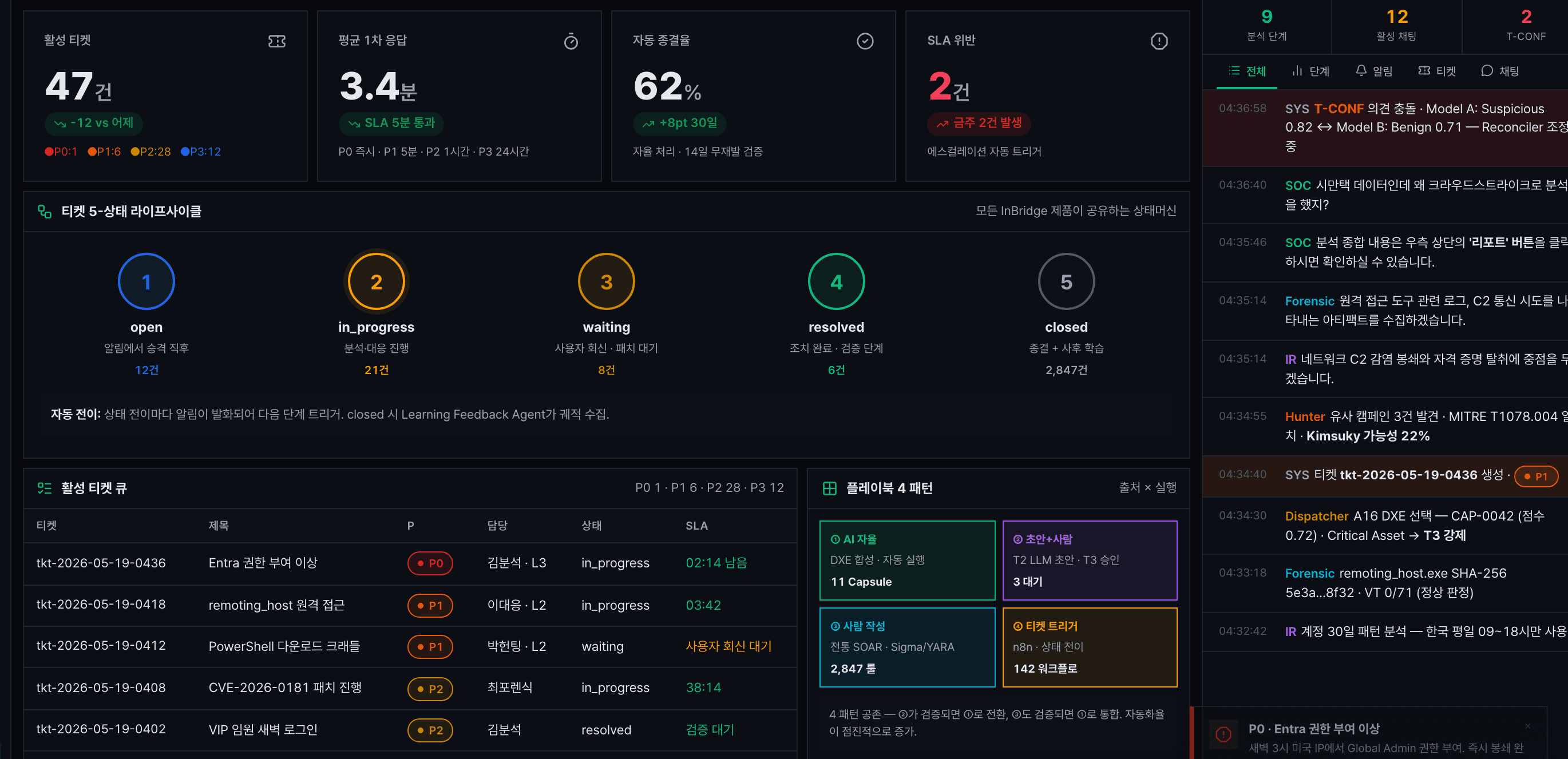
Active ticket status, the five-stage flow from open to closed, and a ticket list carrying priority, owner, and deadline — the whole path from a ticket being created to being closed is visible.
See all capabilities and the handling flow
Follow-up research, checks, development requests, and documentation after an incident also flow into ticket-centred work and a record of what was learned. The process, the workspace screens, and the integration setup are covered in detail on the product page.